


-
Head up display
Head up display
Couldn't load pickup availability
Head up display
Material: Plastic
Type: Car computer monitor
Model; new i9
Applicable models: General
Screen type; imported aviation special LED lights
Screen size; 5.5 inch
Appearance size: 131*85*14(mm)
Color : color
Bandwidth; 50 (MHz)
Resolution : 1000
Compatibility; strong
Input signal; automotive OBD interface
Picture tube; LED light
Standard; binary
Item number; new i9
I9 features introduced
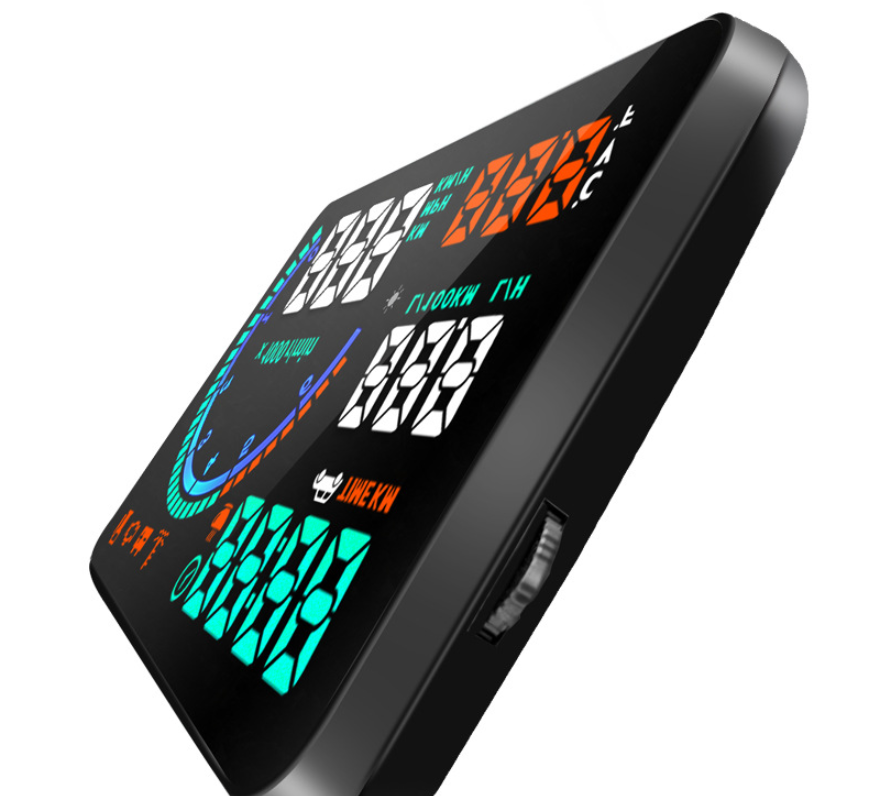
Display: speed, speed, instant water temperature, instantaneous voltage, average fuel consumption, instantaneous fuel consumption, mileage, clear fault code, Beijing time, travel time, public mile switch
Alarm: speed warning, water temperature reminder, voltage reminder, fatigue driving reminder, fault reminder, oil quantity reminder, speed reminder
Mode: can be switched separately to display only speed, speed, fuel consumption and only display speed
Compatibility: 5.5-inch large screen, more than 95% of models can be installed after 2007, compatibility is very strong, new automatic boot and automatic shutdown options have been added, which can not automatically switch on and off.
Brightness: You can choose auto-sensing to adjust the brightness automatically or choose to adjust the brightness of 1-20 layers manually.

1)How to place my order?
1a. Place an order
- Click the product you would like to purchase at product page.
- Select variant.
1st payment option (PayPal)
- Click “Buy with PayPal”
- Follow the requirement step by PayPal.
2nd payment option ( Visa, Mastercard, Apple Pay, AMEX & PayPal)
- Click “More payment option”
- Fill up requirement information.
- Click “Continue To Shipping”
- Your contact information and shipping address will appear at shipping method page.
(Note : Confirm your contact information and shipping address before you select the shipping method.)
- Select your preferred shipping option.
- Click “Continue to payment”
- Fill up requirement information.
(Note : If you wish to pay by using PayPal payment option, please select the “PayPal” icon.)
- Select your Billing address.
- Click “Pay now”.
(Note : If you select pay by using PayPal payment option, you may follow PayPal instruction.)
1b. Check out item at your cart
- Click “Add to cart” icon to add your preferred item in your cart.
- Click on “Shopping bag” icon at the top right of the page.
- Click the “Check out” icon to place order. Fill up requirement information.
- Click “Continue To Shipping”
- Your contact information and shipping address will appear at shipping method page.
(Note : Confirm your contact information and shipping address before you select the shipping method.)
- Select your preferred shipping option.
- Click “Continue to payment”
- Fill up requirement information.
(Note : If you wish to pay by using PayPal payment option, please select the “PayPal” icon.)
- Select your Billing address.
- Click “Pay now”
(Note : If you select pay by using PayPal payment option, you may follow PayPal instruction.)
About Global Trade Leader
We are the worldwide trading warehouse with selling more than 100,000 product, to more than 200 of country, with running 6S concept : 1S (Sourcing), 2S (Sell), 3S (Ship), 4S (Save time), 5S (Save energy), 6S (Save money) to provide one stop services to our global customer.
Contact Us
Email :


